
Introduction
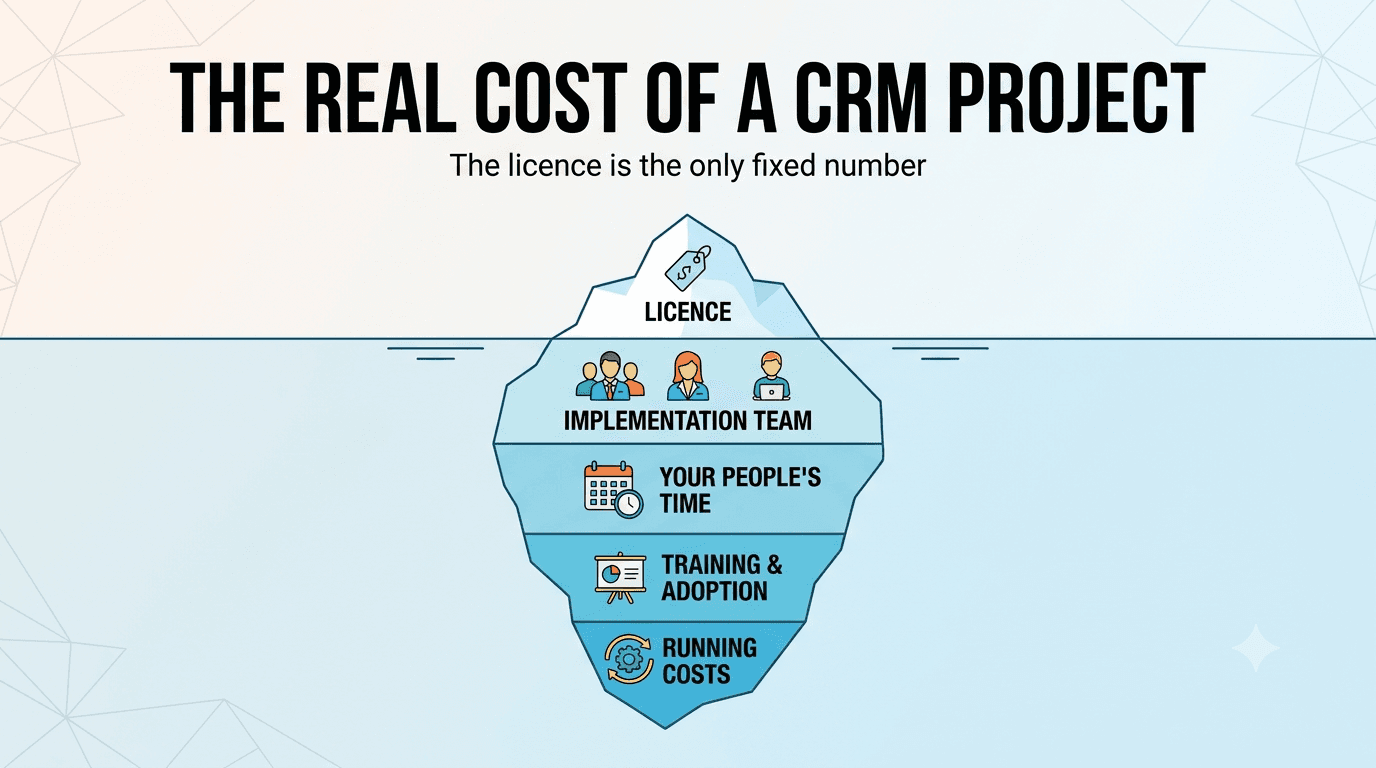
The first number anyone quotes for a CRM is the licence price: 20 users at USD 23 a month, done. Then the project starts, and the costs arrive for things nobody put in the spreadsheet: the partner team that configures it, the weeks the sales manager spends redrawing the pipeline, the data that turns out to be half duplicates, the integrations with the tools the business already runs on, the second training session because the first one did not stick.
In the projects I have implemented, the licence is rarely the largest line, and it is the only line that is fixed. Everything else depends on decisions you make before signing. This article gives you a cost model with five buckets, a worked example for a typical 20-person sales team measured in effort rather than invoices, the places where budgets actually blow up, and a worksheet to build your own estimate before you talk to a vendor.
Licence figures are US list prices from the vendors' pricing pages as of September 2026. Everything else is deliberately given as effort and roles, not money: partner rates, team sizes and salaries differ too much between markets and vendors for a dollar figure to be honest. Multiply the effort by your own rates and you have your number.
The Five Buckets
| Bucket | What goes in it | Who carries it | When |
|---|---|---|---|
| 1. Licences | Per-user or per-organisation subscription, add-on products (help desk, marketing, portals), extra storage and API capacity, AI credits | Vendor invoice | Every month, forever |
| 2. Implementation | Requirements workshops, configuration (fields, pipelines, layouts, roles), automation and process rules, integrations, data migration, testing, go-live support | Partner or freelancer invoice | Once, before go-live |
| 3. Your own people's time | Process design, answering the partner's questions, cleaning data, user acceptance testing, being the internal champion | Salaries you already pay | Before and during go-live |
| 4. Training and adoption | Training sessions, documentation, the productivity dip in the first weeks, follow-up coaching | Partner invoice and your time | Go-live plus two to three months |
| 5. Running costs | An administrator, changes as the business changes, integration maintenance, licence growth, edition upgrades | Your time, sometimes a partner on retainer | Every month, forever |
Two things are missing from most budgets. Bucket 3 is never invoiced, so it never appears, although it is often the single largest line. And bucket 5 is treated as zero, although a CRM that is never adjusted after go-live is abandoned within a year.
A word on "adoption". Adoption means the share of users who actually work inside the CRM every day: log calls, move deals, update fields, read their dashboard. A system with 20 licences and 8 active users has 40 percent adoption. It is the number that decides whether the project paid off, and it is the one nobody budgets for.
Who Does the Implementation Work
Bucket 2 is not "a partner". It is a team, and its size sets the cost:
| Role | What they do | When you need them |
|---|---|---|
| Project manager | Plan, scope control, weekly cadence with your team | Any project longer than a few weeks |
| Business analyst | Turns your process into requirements, writes the field list, pipeline stages and rules, runs testing | Always |
| Solution architect | Decides how the CRM, its edition and the surrounding systems fit together; owns the integration design | Whenever there is more than one system involved |
| Technical lead and developers | Custom functions, scripts, integrations, data migration tooling | Whenever a requirement cannot be met by configuration |
| Trainer | Sessions, materials, follow-up coaching | Always, sometimes the BA |
A small rollout (10 to 30 users, one pipeline, one or two integrations) is a BA and a developer for a few weeks. A large one (hundreds of users, several business systems to connect, phased go-lives) is the full table above for a year or more. When a partner quotes a number, ask which of these roles are in it and for how many days; that is the only way two quotes become comparable.
A Worked Example: 20 Sales Users
The example company has 20 sales reps and 2 managers, sells to businesses through a defined pipeline, needs quotes generated from the CRM, wants leads from its website to land in the CRM automatically, and needs the CRM connected to two tools the team already lives in: its Microsoft 365 tenant (email, calendar, Teams) and the document system where contracts are stored. That is a very ordinary mid-market requirement, and it maps to Zoho CRM Professional (see How To Choose the Right Zoho CRM Edition).
Bucket 1, the only line in money
| Line | Assumption | Cost |
|---|---|---|
| Zoho CRM Professional | 22 users × USD 23 × 12 months, annual billing | USD 6,072 per year |
| Add-ons you already know about | E-signature for contracts, a help desk if support moves into the CRM | List price × 12; often zero in year one |
Buckets 2 to 4, in effort
| Line | Partner effort | Your team's effort |
|---|---|---|
| Requirements and process design | BA, 2 workshops and write-up, about 3 days | Sales manager 3 days, 2 reps half a day each |
| Configuration: modules, fields, 2 pipelines, layouts, roles, Blueprint, 10 to 15 workflows | BA and developer, 8 to 12 days | Sales manager reviewing, 2 to 3 days |
| Website lead capture: web forms, assignment rules | Developer, 1 to 2 days | Marketing owner, half a day |
| Microsoft 365 connection: mail sync, calendar, single sign-on | Developer, 2 to 4 days | IT admin, 1 day for tenant permissions |
| Document system integration: link contracts to deals, push signed files back | Architect half a day, developer 4 to 8 days depending on the document system's API | Contract owner, 1 day defining the rules |
| Data migration: 5,000 contacts and 1,500 deals from spreadsheets | Developer, 3 to 5 days for mapping, import, verification | Data owner, 5 to 10 days cleaning before the import |
| Testing | BA, 2 days | 2 reps and 1 manager, 2 days each |
| Training | Trainer, 2 sessions for reps, 1 for managers, materials, about 2 days | Everyone, half a day each; reps at reduced speed for 2 to 3 weeks |
| Go-live support | Someone reachable for 2 weeks, 2 to 4 days of actual work | Internal champion, 2 to 3 days |
| Total | About 25 to 45 partner days across BA, developer, architect and trainer | About 35 to 50 internal person-days, most of it the sales manager and the data owner |
Read the right-hand column twice. It never appears on an invoice, and it is the column that decides whether the project is on time: every day the sales manager cannot free up is a day the partner waits.
Bucket 5, every year after
| Line | Effort |
|---|---|
| Administrator: user changes, small tweaks, reports, first-line questions | Roughly one day a week of someone's time for 20 users; a full-time role somewhere above 150 to 200 users |
| Changes and small projects: a new pipeline, new reports, another integration | 5 to 10 partner days a year, or the same in internal time if you have a capable admin |
| Integration maintenance: the other system updates its API, tokens expire, an edge case appears | A few days a year per integration, unpredictable in timing |
| Licence growth and edition upgrades | New hires, and the feature that turns out to live one edition up |
Where Budgets Blow Up
Ranked by how often I see it, not by size.
- Low adoption. The most expensive CRM is the one reps do not use. If half the team keeps working from spreadsheets, you paid full price for half the value, and the reports lie. Adoption is a training and management problem, not a software problem, and it needs effort in bucket 4 and attention in bucket 5.
- Dirty data. "We will just import the spreadsheet" turns into weeks of de-duplication, phone numbers in five formats and companies spelled four ways. Data cleaning is almost always underestimated by a factor of two to three, and it is your team's time, not the partner's.
- Integrations. The system you must connect to has an undocumented API, or no API at all, or the connector exists but does not handle the one field that matters. Every integration is a small software project with its own testing, its own maintenance and its own owner on the other side.
- Scope creep during configuration. Once people see the pipeline on screen they want the support module, the customer portal and a dashboard for the CEO. Each is reasonable; together they double the partner's days. Phase them.
- Edition creep. The feature you need in month four lives one edition up. On Zoho that is USD 17 more per user per month; on HubSpot it is the jump from Starter to Professional. Price the edition your process needs on day one.
- Custom code. Custom functions, scripts and connectors are quick to write and permanent to maintain. Every line needs an owner after the partner leaves.
- Nobody owns it. Without a named administrator, small problems accumulate until the system no longer matches the business, and the next project is a re-implementation.
Build Your Own Estimate
Copy this into a spreadsheet. Fill the licence lines in money and everything else in days, then multiply the partner days by the rate your partner quotes and the internal days by what a day of that person costs your company.
| Line | Your assumption | Unit |
|---|---|---|
| Users now and in 12 months | users × price × 12 | |
| Add-on products you already know you need | help desk, marketing, portals, e-signature | list price × 12 |
| Partner roles in the quote | PM, BA, architect, developers, trainer | days per role |
| Configuration | 5 to 15 days for a mid-market sales process | partner days |
| Integrations | number of systems × 2 to 8 days each | partner days |
| Data migration | 2 to 5 partner days; 2 to 3× that in your own cleaning time | partner days plus internal days |
| Training | 1 session per 10 users plus managers | partner days |
| Internal person-days | manager 10 to 20, testers 5 each, data owner 5 to 10 | internal days |
| Admin time after go-live | 0.2 FTE for 20 users, scaling with head count | internal days per year |
| Change budget per year | 20 to 40 percent of the implementation effort | partner or internal days |
| Contingency | 15 to 25 percent of everything above |
Then run three columns: low, expected, high. If the high column is not affordable, cut scope in bucket 2 (fewer integrations, one pipeline, phase two later), not in bucket 4. Cutting training is how you end up in the first item of the previous section.
Questions To Ask a Partner Before You Sign
- Which roles are in the quote, and how many days each? Configuration, integration and project management should be separate lines.
- Who cleans the data, and what happens if it takes longer?
- Which requirements need custom code, and who maintains that code in year two?
- What is included in go-live support, for how long, and what does a change request cost afterwards?
- Which edition do you assume, and which of our requirements would push us up an edition?
- Can you show a reference project of a similar size, and how did their effort end up versus the quote?
Conclusion
A CRM project is mostly people's time: a partner team for a few weeks or a year depending on size, and your own managers, reps and data owners for more days than anyone expects. The licence is the smallest and most predictable part. That is not an argument against buying a CRM; a working one pays for itself many times over in a sales team that follows up on every lead. It is an argument for budgeting all five buckets, phasing the scope, protecting the training effort, and naming an owner before go-live. Do that, and the number on the licence quote stops being a surprise and becomes what it should have been all along: the easy line in the plan.